
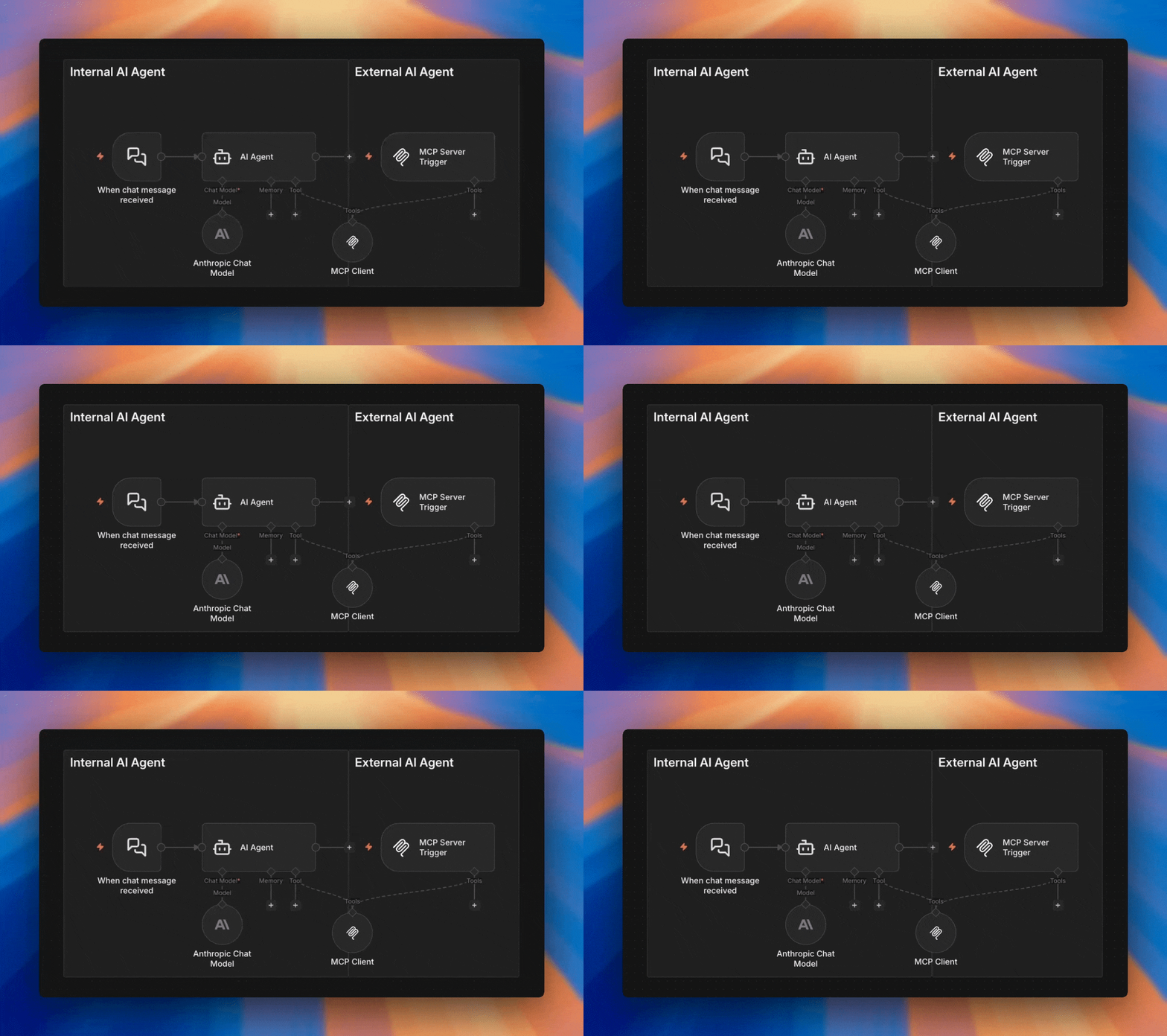
How MCP Works in n8n
Gateway, Trigger, and Tool — Three Ways to Connect AI
MCP — Model Context Protocol — is an open standard that lets AI models call external tools through a universal interface. It's how my AI assistant checks my calendar, writes to my journal, and manages my event automation — all without being locked into any single AI provider.
n8n has three distinct ways to work with MCP. If you've been confused about what they are and when to use each one, you're not alone. The naming doesn't help. So let me break it down.
Why MCP Feels Different
If you've used n8n before, you're used to integrations coming in pairs — a trigger and a node. Gmail Trigger and Gmail Node. Slack Trigger and Slack Node. One to receive, one to send.
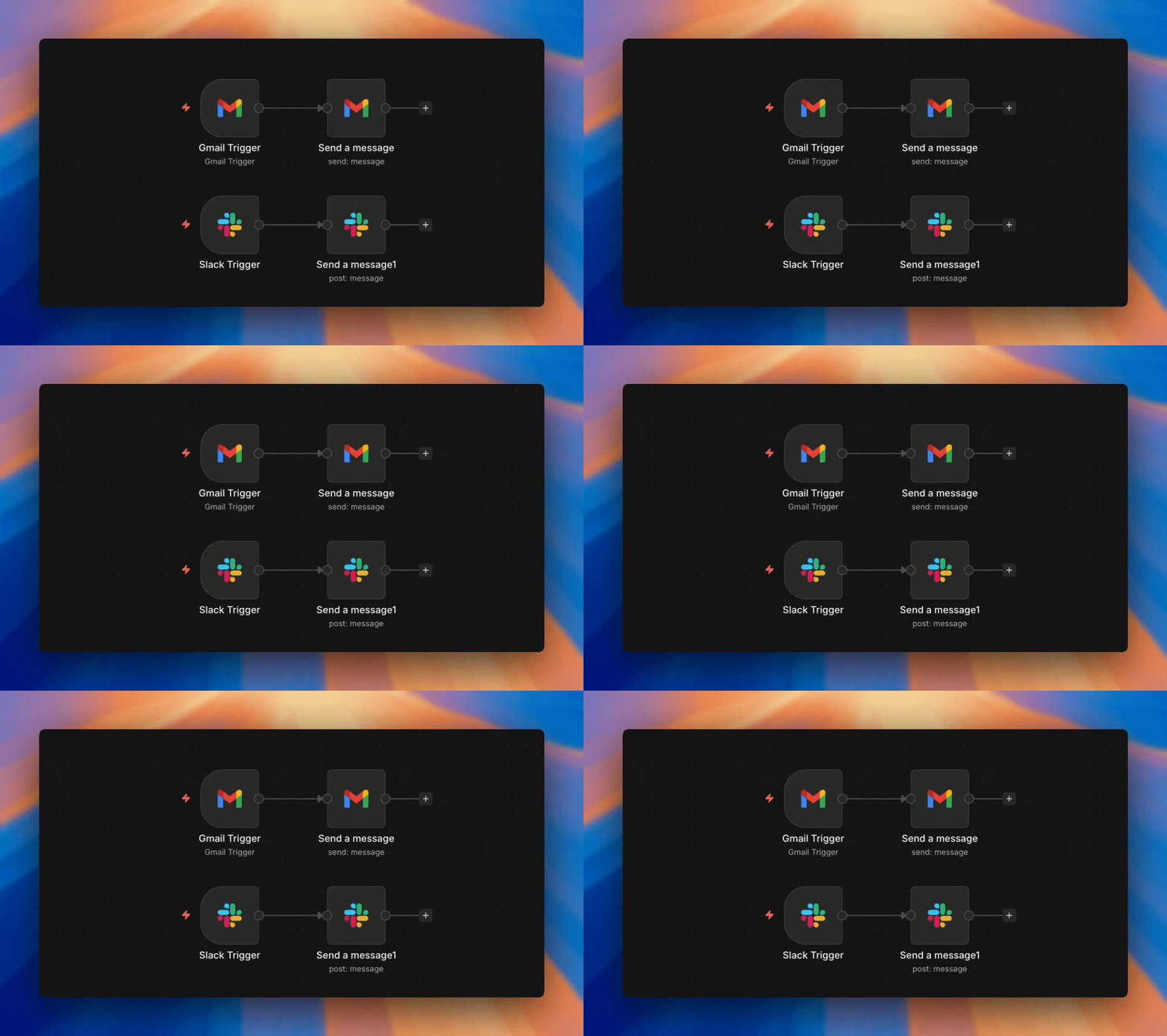
MCP breaks that pattern. There's no MCP "node" in the traditional sense. Instead, that node is split into two pieces: the MCP Server Trigger receives calls from external AIs, and the MCP Client Tool lets your n8n agents call out to external MCP servers, acting as a client to them.
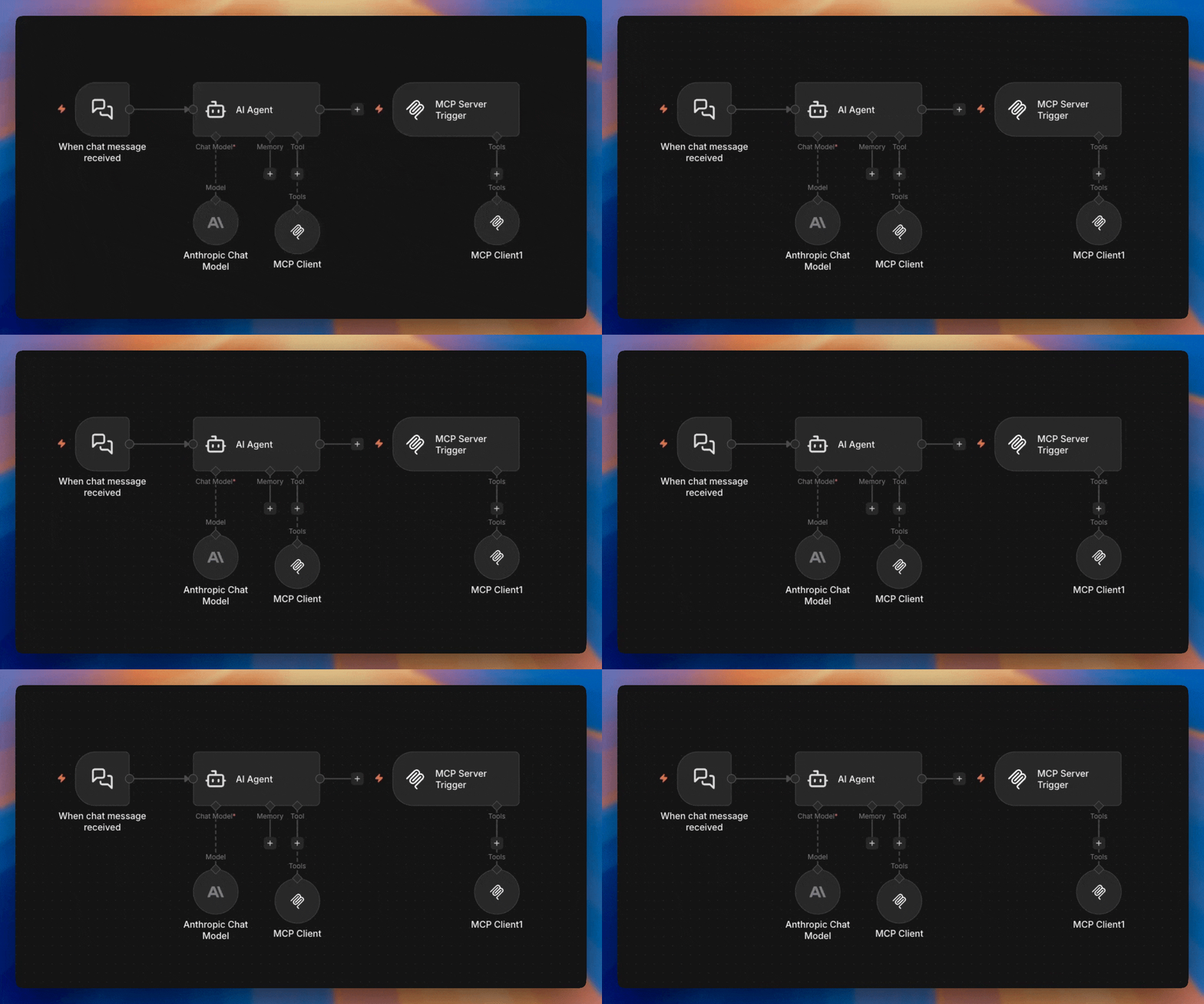
Same integration, two shapes, because the two directions live in fundamentally different contexts — one starts workflows, the other attaches to AI agents.
And sitting above both is a third capability: MCP Access, an instance-level feature where your entire n8n deployment acts as a single MCP server.
Three capabilities. Three official names that are a bit of a mouthful:
| What it's Called | When do I use it? | Where is it in n8n? |
| MCP Access* | Create or Trigger workflows in a specific n8n instance | n8n settings popup. |
| MCP Server Trigger | Give External AI's Access to n8n tools (including the MCP tool) | n8n nodes panel. |
| MCP Client Tool | Allow internal and external AI agents the ability to use MCP servers. | n8n AI agent Tool selector and the MCP server trigger tool selector. |
If engineering is reading this — you're welcome. Also, I know that MCP Access is not it's real name, but it's what they put on the n8n label so for the sake of uniqueness, I'm going to pretend it is.
Plus, I would argue that much of the confusion exists because the names are two similar. MCP Server Trigger vs MCP Server is very difficult to communicate verbally and mentally. I know I've struggled in the past to communicate it effectively.
MCP Access
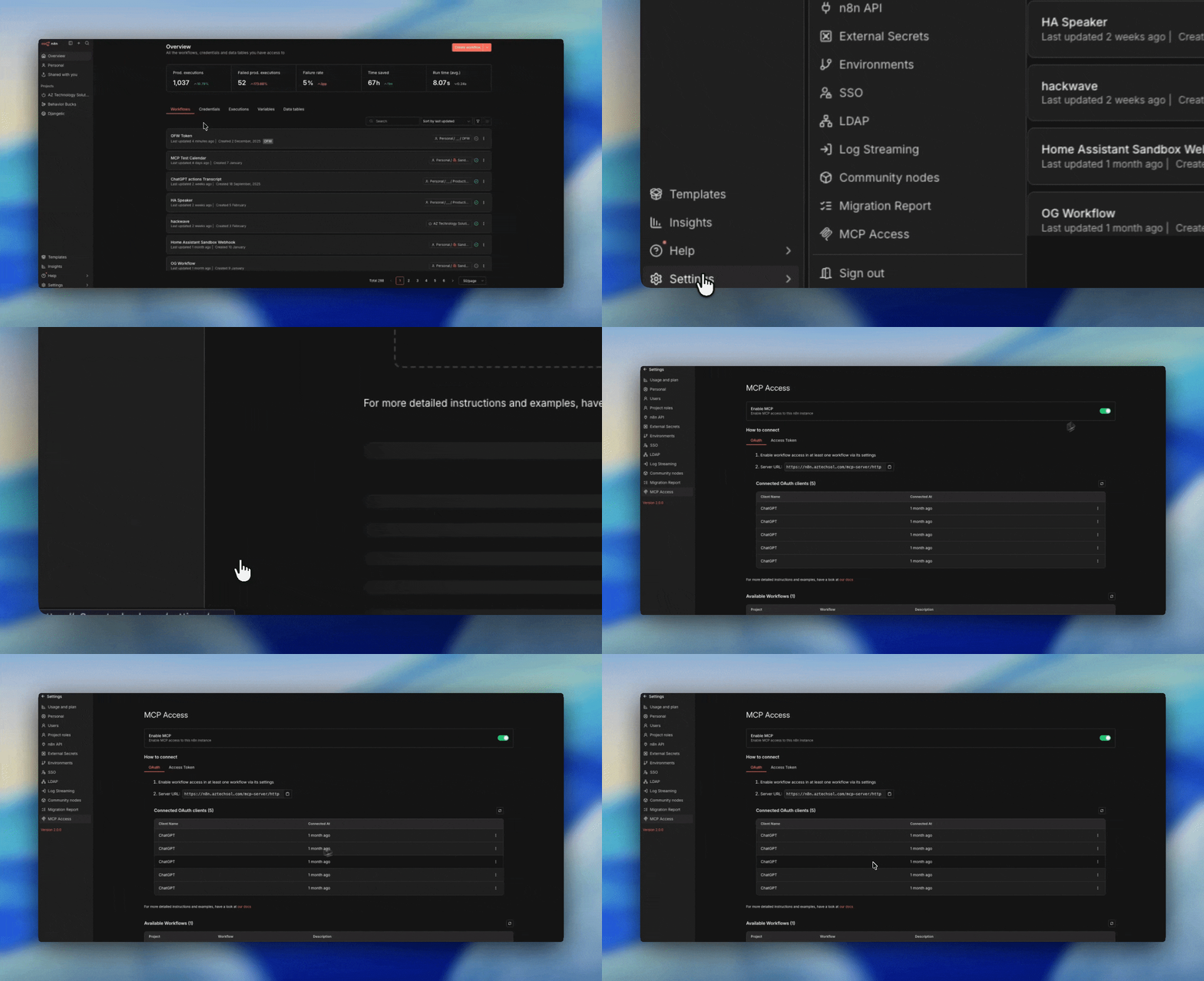
Official name: MCP Access • Instance-level • OAuth
The MCP Gateway turns your entire n8n instance into a single MCP server. External AI clients — Claude Desktop, OpenClaw, custom agents — connect through one URL with OAuth authentication.
The setup is simple: go to any workflow's settings and flip the "Available in MCP" toggle. That workflow becomes a tool that external AIs can discover and call. No special trigger nodes required. No per-workflow URLs to manage.
When to Use the Gateway
- You want a single connection point for external AIs
- You need OAuth authentication (e.g., connecting from ChatGPT)
- You want to expose existing workflows without modifying them
- You're managing access centrally at the instance level
Think of it as the front door. One entrance, one bouncer, one clipboard. The AI shows up with OAuth credentials, the Gateway checks the list, and routes the request to whichever workflow the AI asked for.
MCP Server Trigger
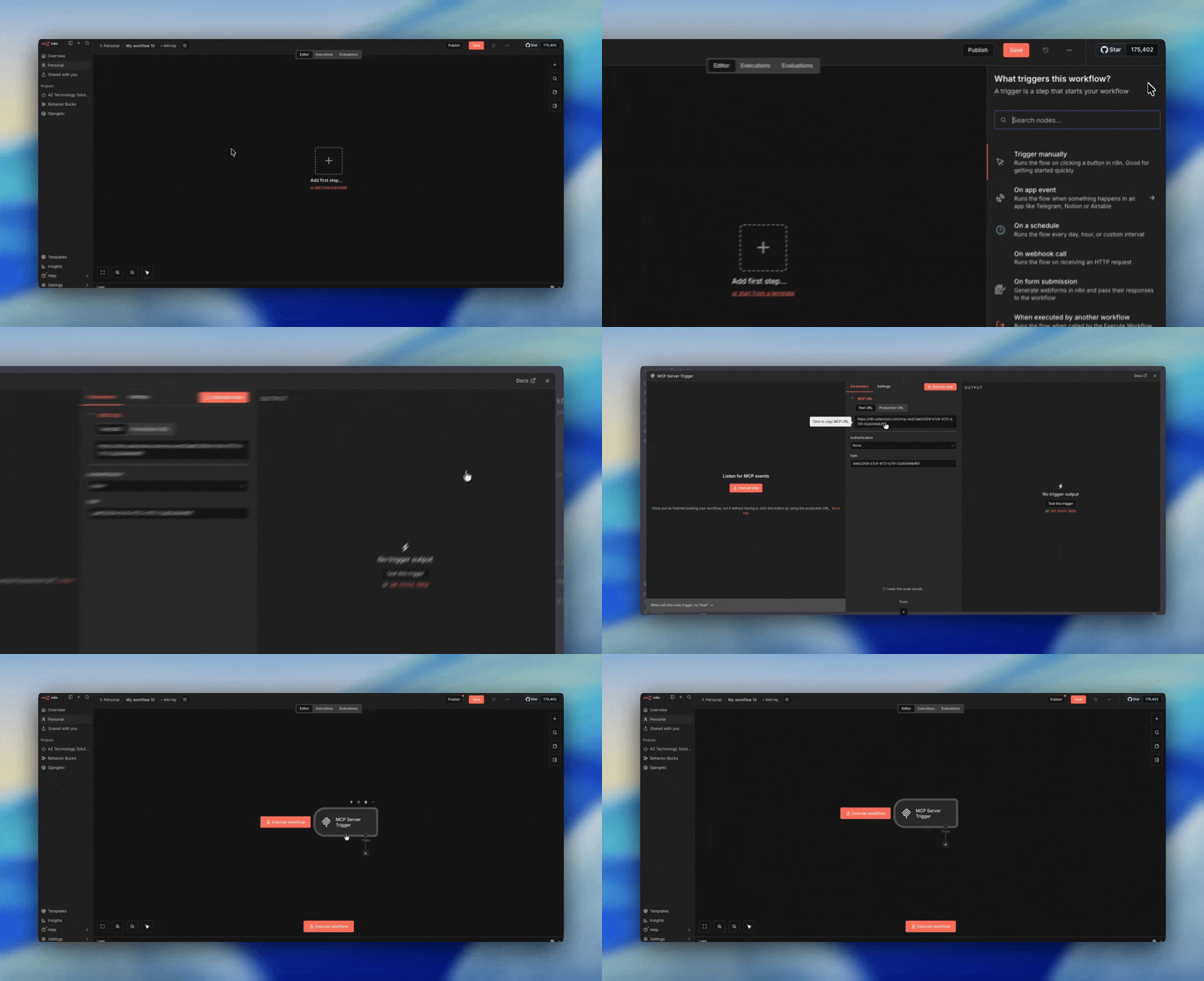
Official name: MCP Server Trigger • Workflow-level • Header/Bearer auth
The MCP Trigger is a workflow-level entry point. You create a dedicated workflow, drop in the MCP Server Trigger node, and attach tool nodes to it. Each trigger gets its own unique URL that external AIs can call.
Unlike the Gateway, you're building the workflow yourself. You decide exactly which tools to expose, what authentication to require (header auth or bearer), and how the workflow processes requests. It's more manual, but you get granular control.
When to Use the Trigger
- You want full control over which tools are exposed together
- You prefer header auth over OAuth (simpler, no token refresh)
- You want to use the Custom n8n Workflow Tool to expose entire workflows as tools
- You're building a dedicated MCP endpoint for a specific AI client
Think of it as a side door with its own lock. More setup, but you control exactly who gets in and what they can reach.
⚠️ On Authentication
The MCP Trigger supports header auth and bearer auth. Running it with no authentication is technically possible but means anyone who finds the URL can call your tools. That's essentially a verbose, self-describing webhook with zero protection. Always use auth.
MCP Client Tool - Internal Vs External
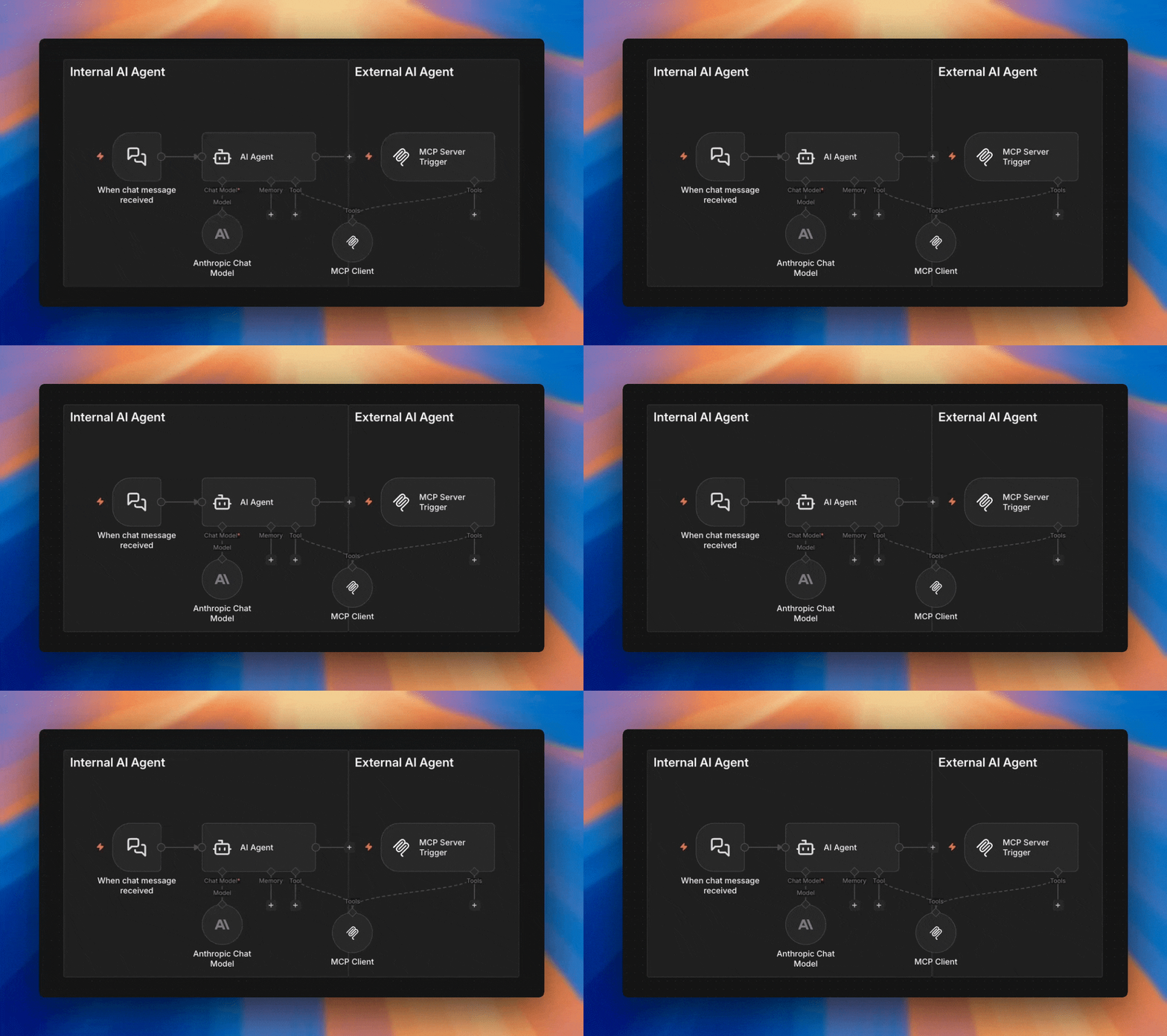
Official name: MCP Client Tool • Sub-node • Attaches to AI agents
The MCP Tool goes the other direction. Instead of receiving calls from external AIs, it lets your n8n AI agents call out to external MCP servers.
When you build an AI agent both inside n8n and even externally to n8n via the MCP server trigger, you will want it to use MCP servers hosted somewhere else — on another n8n instance, a third-party service, or a custom MCP server — you attach an MCP Client Tool node. n8n becomes the client, connecting to someone else's MCP server to discover and call their tools.
This is further complicated by the fact that the AI agent can be internal or external to n8n.
Internal n8n AI Agent Tool:
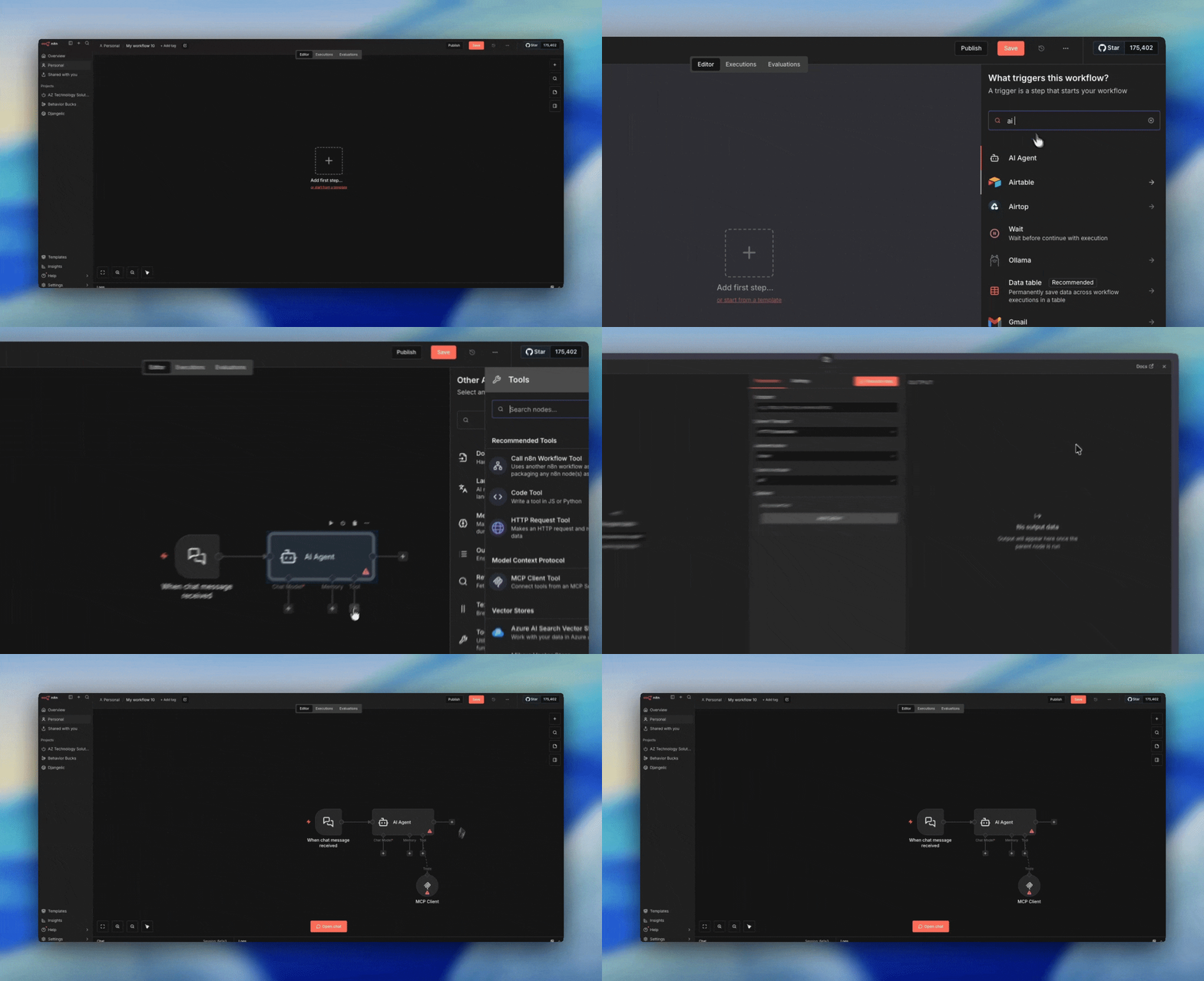
You want to give an n8n AI agent access to an MCP Server (You can even give them access to an n8n MCP Gateway (server) so that the AI agent can build or even trigger workflows.)
External AI Agent via MCP Server Trigger
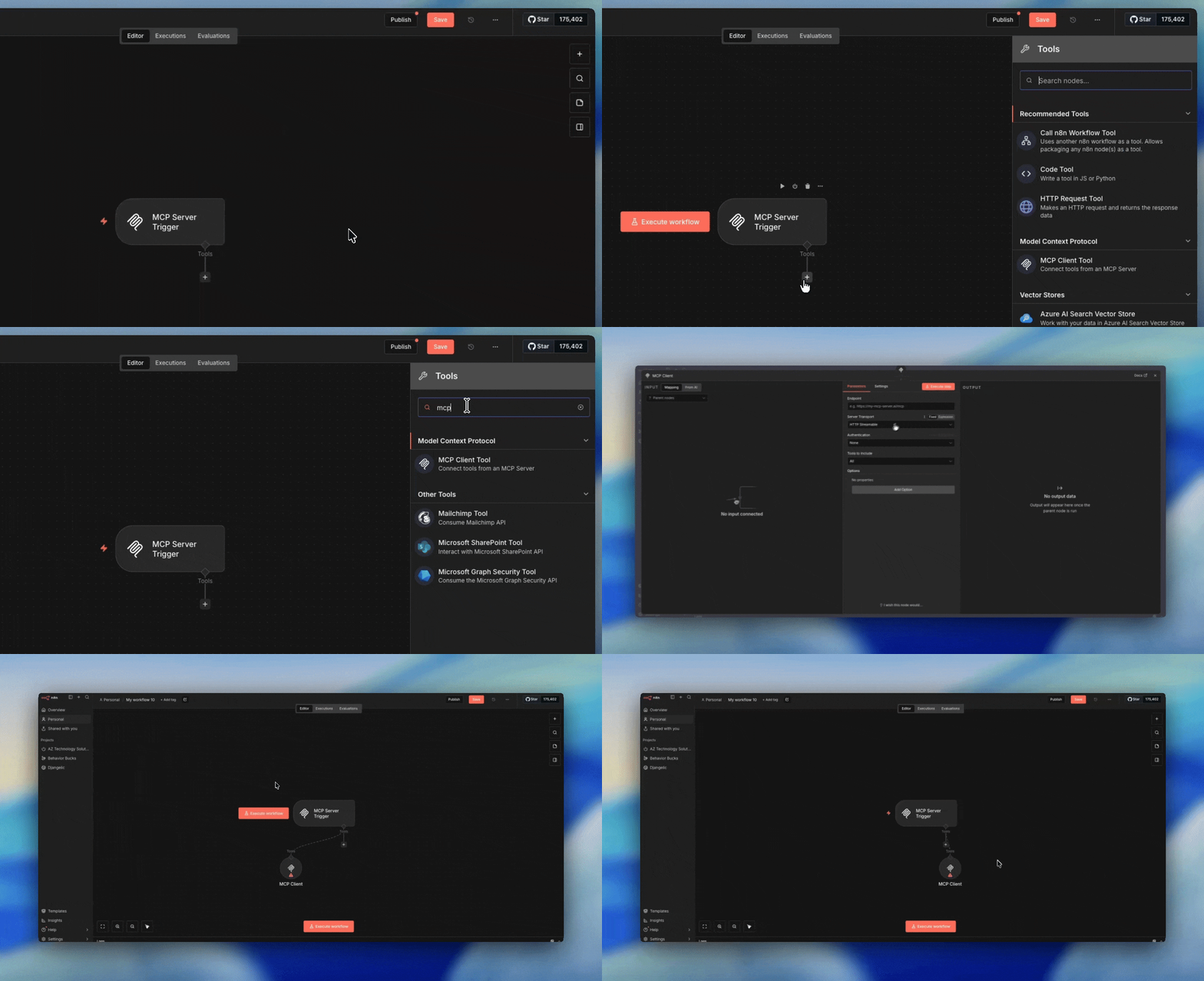
You want to give an external AI agent access to an MCP server (You can even give them access to an n8n MCP Gateway (server) so that the AI agent can build or even trigger workflows.)
When to Use the Tool
- You're building an AI agent inside n8n
- You want an external AI agent to n8n to have MCP access.
- You want those agents to use tools hosted on an external MCP server
- You need OAuth2 authentication to the external server
- You want to selectively expose only certain external tools to your agent
The MCP Tool supports bearer, header, and OAuth2 authentication — it's the only one of the three that supports OAuth2 as a client, because it's the one reaching out to external services that may require it.
How They Fit Together
MCP Gateway
Instance • OAuth • One endpoint
The front door. External AIs connect with OAuth, call any toggled-on workflow.
MCP Trigger
Workflow • Header auth • Per-URL
The side door. Dedicated workflow with its own URL and attached tools.
MCP Tool
Sub-node • Agent-attached • Outbound
The other direction. n8n or external agents reach out to external MCP servers.
The Gateway and Trigger handle the receiving side — external AIs calling into n8n. The Tool handles the sending side — n8n calling out. Together, they're the complete MCP integration.
The OAuth Layer
Here's what makes this powerful for portability: n8n handles all the OAuth on the backend. Your AI connects to n8n with simple header auth (via the Trigger) or OAuth (via the Gateway). n8n connects to Google, Slack, Notion, and everything else using its own stored credentials. The AI never touches those tokens directly. Swap the AI, keep the tools. Swap the tools, keep the AI.
My Setup
I use the MCP Trigger for my personal AI assistant. Here's what I've connected — each is an n8n workflow my AI can call on demand:
📅 Calendar Access
Check my work calendar (busy/not busy), manage my personal calendar, and access my custody calendar in read-only mode.
📝 Notes System
Direct access to my journal via Obsidian. The AI can review recent events or save new notes, automatically tagging content.
Real Use Cases
Custody Calendar Visualization
I screenshot a proposed custody trade, send it to my AI. It extracts the details and creates temporary calendar entries so I can visualize the impact before agreeing.
Local Event Scraper
Pulls events from Tucson websites, processes them, pushes to a shared Google Calendar for 150+ people.
Meeting Transcripts
Record via Apple Watch, iOS shortcut prompts for context, audio transcribed locally, summarized by local model, sent via webhook to n8n for Obsidian storage.
When I transitioned from ChatGPT to Claude to OpenClaw, none of these tools required changes. Re-pointed the model, back to work in minutes. That's the whole point.
Here's a raw video of me setting it up with Cortana, my OpenClaw assistant:
Access, Trigger, or Tool — Which Should You Use?
Use MCP Access when...
- You want one connection for everything
- Your AI client requires OAuth (like ChatGPT)
- You want to expose existing workflows or upload new ones
- You're managing multiple AI clients centrally
Use the MCP Server Trigger when...
- You want granular control over exposed tools
- Your use case only requires Header or Bearer auth.
- You're building a dedicated endpoint for one AI client
- You want to process requests with custom workflow logic
Use the MCP Client tool when...
- You want to give an AI (both internal or external to n8n) access to an MCP server.
All three implementations have different uses and use cases, and each of them make an AI more powerful than before, thanks to the power of n8n.
Why Portability Matters
This post covers the technical how. For the personal story behind why I built my AI setup to be portable — and what happened when I switched from ChatGPT to Claude overnight — read the companion piece.
Read The AI Dependency Trap →